PromptDrip
PromptDrip 8K AI PROMPT VAULT
PROMPT DETAIL

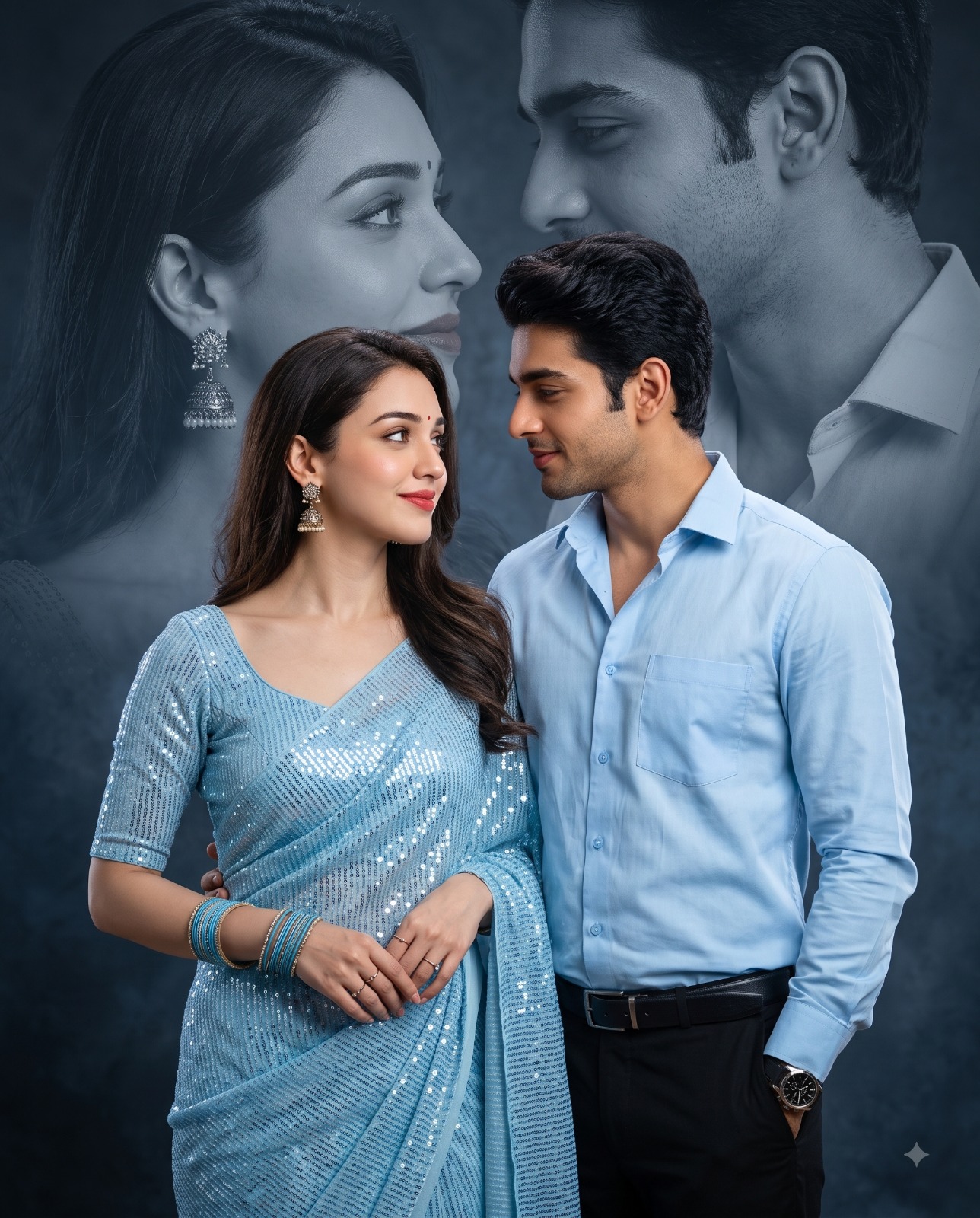
Blue Outfit Cinematic Double Exposure Couple Portrait

Shared by @PromptDrip • Sep 21, 2026

PROMPT

Optimized for Gemini

Use the uploaded image strictly for accurate facial identity matching of both subjects. Create a photorealistic cinematic romantic couple portrait featuring an couple standing close together, looking lovingly into each other’s eyes. Composition: Vertical 4:5 portrait, mid-thigh-up framing. The woman stands slightly in front on the left, while the man stands beside her on the right, creating an intimate balanced composition. Add a large, softly blended monochrome blue-gray double-exposure portrait of the same couple in the background, showing their faces in profile as they gaze at each other. Woman: Elegant woman with naturally styled hair, subtle bindi, wearing a shimmering light sky-blue sequined saree with matching blouse, traditional silver/gold jhumka earrings, multiple blue bangles, delicate rings, natural makeup, soft red lipstick. Man: Handsome man with neatly styled hair, wearing a light sky-blue button-up shirt, black trousers, black belt, and a premium wristwatch. Pose & Expression: Couple standing naturally close, facing each other with gentle romantic eye contact. The woman has a soft, subtle smile while the man looks at her affectionately. Relaxed, elegant body language. Background: Dark cinematic smoky studio background in deep blue-gray tones, with the large monochrome couple portrait softly faded behind the foreground subjects. Smooth atmospheric texture and subtle vignette. Lighting: Soft cinematic studio lighting, gentle key light on the faces, subtle rim lighting, controlled highlights on the saree sequins, moody blue ambient tones, realistic skin tones, soft shadows. Camera: Eye-level angle, 85mm portrait lens, f/1.8, shallow depth of field, realistic bokeh, high-end professional photography, cinematic color grading, ultra-detailed fabric and skin textures, HDR, photorealistic, 8K resolution. Negative prompt: distorted face, identity change, bad anatomy, blurry faces, plastic skin, oversaturated colors, warped clothing, text, watermark, logo.

ChatGPT Gemini

How to Use This Prompt

Quick 3-step guide to generate or edit your AI photo

1

Copy Prompt

Click the orange Copy button above to copy the prompt text.

2

Open AI Tool

Open Gemini or ChatGPT using the 1-click buttons.

3

Paste & Generate

Paste the prompt, attach your photo (optional), and hit send to get your 8K photo!

💡 Pro Tip: Attach your reference portrait photo with the prompt in Gemini or ChatGPT to generate this exact aesthetic with your own face!

Community Rating

4.7
29 Ratings
5
23
4
4
3
1
2
1
1
0

Rate this prompt

Model or Tool

Gemini

You might also like

8K AI Prompt copied to clipboard!