PromptDrip
PromptDrip 8K AI PROMPT VAULT
PROMPT DETAIL

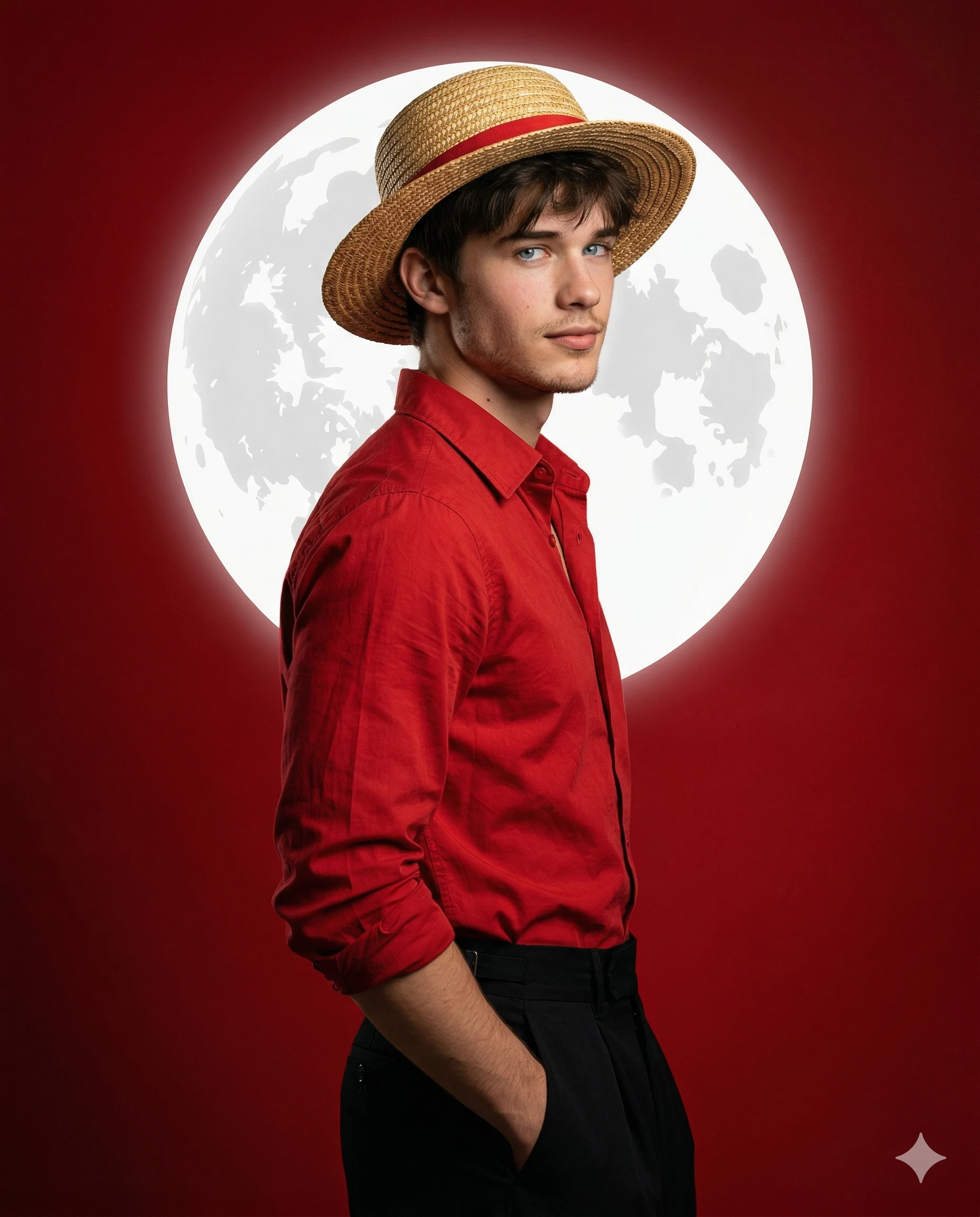
Moonlight Captain Ai Art

Shared by @PromptDrip • Sep 21, 2026

PROMPT

Optimized for Gemini

Use the uploaded image ONLY for face and identity reference. Do not modify facial structure, skin tone, hairstyle, or natural features. Preserve exact identity with natural imperfections. Create a high-quality, cinematic studio portrait of a young man cosplaying as a Luffy-inspired character (anime-inspired but photorealistic). COMPOSITION (LOCKED) Vertical 4:5 aspect ratio. Three-quarter profile pose, subject turned slightly away from camera and looking back over his right shoulder. Upper-body to mid-body framing. Right hand casually placed inside trouser pocket. Relaxed, confident posture with a subtle smirk. SUBJECT DETAILS Lean build, natural proportions. Hair slightly messy with soft bangs falling over forehead. Expression calm, confident. OUTFIT (IMPORTANT) Straw hat with visible woven texture and a red band (iconic style). Vibrant red button-down shirt, slightly open at the collar, natural wrinkles, matte fabric texture. High-waisted wide black trousers (hakama-inspired), deep contrast and clean silhouette. BACKGROUND & GRAPHIC ELEMENT (CRITICAL) Solid deep red gradient background with subtle vignette (darker edges). Behind the head: a medium glowing white circular realistic moon graphic. Circular graphic contains lunar-style textures (stylized, not realistic). Circular graphic must feel flat-graphic but luminous (2.5D effect). LIGHTING (IMPORTANT) Soft key light from front-left → clean facial highlights and fabric detail. Backlight effect from the glowing circle → creates rim light around hair and hat edges. High contrast but smooth falloff. No harsh shadows on face. COLOR STYLE Dominant palette: Red, White, Black. Strong cinematic contrast, bold and heroic tone. DEPTH & RENDERING Ultra-sharp focus on face and hat. Background stays slightly flat and graphic (not realistic depth). Blend of photorealism + stylized anime-inspired composition. QUALITY Ultra-realistic, 8K, cinematic photography, clean studio finish, no AI-generated look, no smooth face.

ChatGPT Gemini

How to Use This Prompt

Quick 3-step guide to generate or edit your AI photo

1

Copy Prompt

Click the orange Copy button above to copy the prompt text.

2

Open AI Tool

Open Gemini or ChatGPT using the 1-click buttons.

3

Paste & Generate

Paste the prompt, attach your photo (optional), and hit send to get your 8K photo!

💡 Pro Tip: Attach your reference portrait photo with the prompt in Gemini or ChatGPT to generate this exact aesthetic with your own face!

Community Rating

4.6
28 Ratings
5
21
4
5
3
1
2
1
1
0

Rate this prompt

Model or Tool

Gemini

You might also like

8K AI Prompt copied to clipboard!