PromptDrip
PromptDrip 8K AI PROMPT VAULT
PROMPT DETAIL

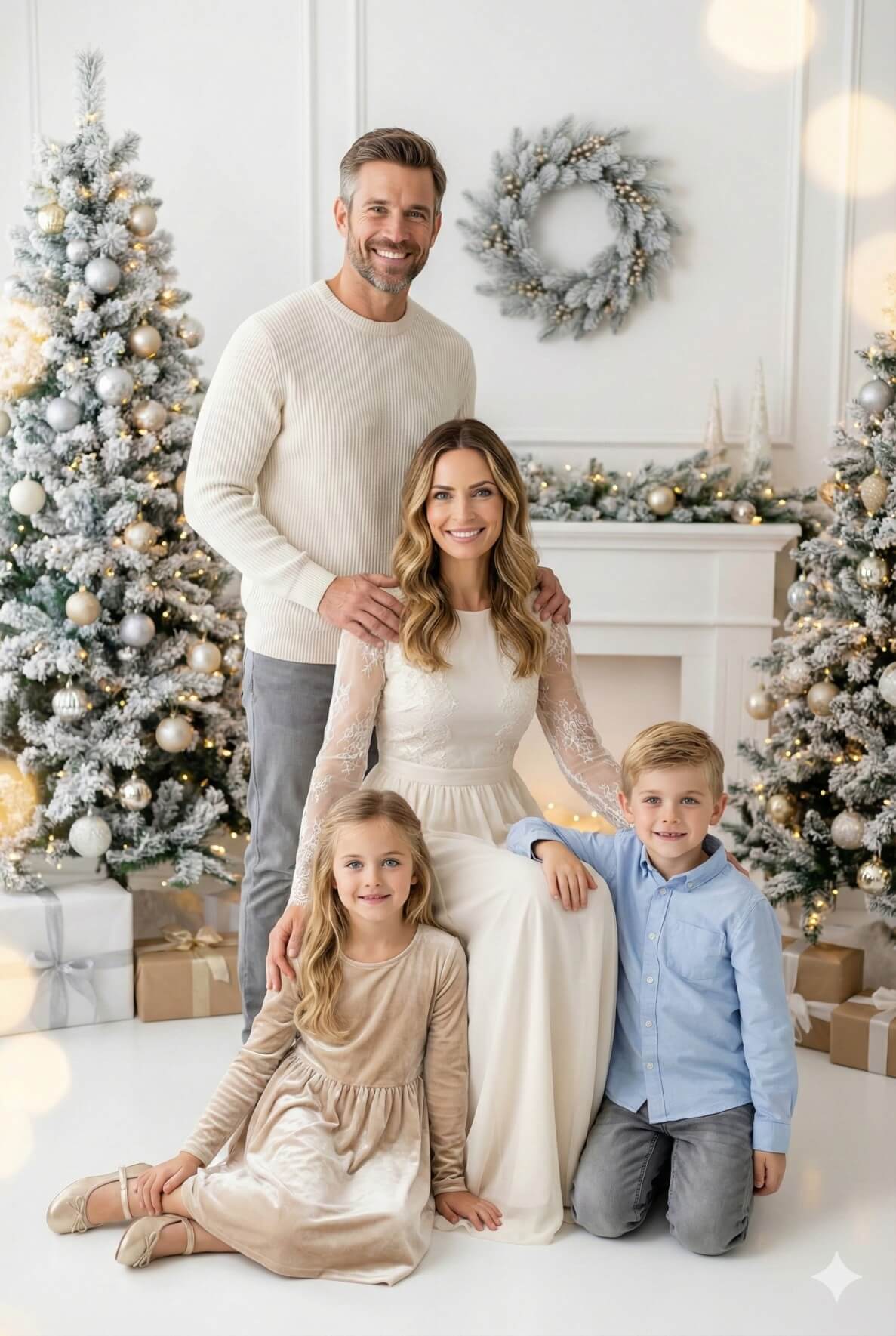
Winter Whites Holiday Lights Christmas Kids Portrait

Shared by @PromptDrip • Sep 21, 2026

PROMPT

Optimized for Gemini

Use the uploaded family photo strictly as a face and identity reference. Preserve each person’s exact facial structure, proportions, skin tone, eye shape, nose, lips, jawline, and expressions. Do not beautify, stylize, or change age/ethnicity. Faces must remain sharp and clearly recognizable. Create an ultra-realistic Christmas studio family portrait, vertical (4:5 or 2:3), in a premium Christmas card photography style. Composition: One adult man standing behind the seated adult woman, hands resting gently on her shoulders. One child girl sitting on the floor slightly forward in a relaxed seated pose. One child boy crouching/kneeling beside her. Everyone looks at the camera with warm, natural smiles. Wardrobe — Match the reference clothing (Main Focus): Man: Off-white/cream ribbed knit sweater (clean, minimal, no logo), paired with light gray fitted trousers. Woman: Elegant ivory/white long dress with a smooth skirt, and sheer lace/chiffon long sleeves with delicate floral texture; soft, bridal-like winter elegance. Girl: Champagne/beige velvet dress, long sleeves, soft plush texture with gentle sheen; cozy and festive. Boy: Light blue button-up shirt (soft cotton look) with gray jeans/trousers; neat but relaxed. Keep the palette consistent: white, ivory, champagne, beige, silver, soft gray. Fabric texture must be clearly visible (knit ribs, lace pattern, velvet sheen, cotton weave). Setting: Bright white studio with two snowy Christmas trees decorated in silver + gold ornaments, warm fairy lights, a white fireplace, and a silver frosted wreath on the wall. Neutral wrapped gifts around the floor. Lighting: Soft, warm, professional studio lighting with gentle glow and subtle bokeh sparkles. No harsh shadows. Quality: Photorealistic, high-resolution (8K look), realistic skin tones, crisp fabric detail, natural folds, premium holiday aesthetic.

ChatGPT Gemini

How to Use This Prompt

Quick 3-step guide to generate or edit your AI photo

1

Copy Prompt

Click the orange Copy button above to copy the prompt text.

2

Open AI Tool

Open Gemini or ChatGPT using the 1-click buttons.

3

Paste & Generate

Paste the prompt, attach your photo (optional), and hit send to get your 8K photo!

💡 Pro Tip: Attach your reference portrait photo with the prompt in Gemini or ChatGPT to generate this exact aesthetic with your own face!

Community Rating

4.7
29 Ratings
5
23
4
4
3
1
2
1
1
0

Rate this prompt

Model or Tool

Gemini

You might also like

8K AI Prompt copied to clipboard!